
Style Guide
The primitives and components used across the Sabine River Partners site. Edit assets/css/tokens.css to re-skin the entire site, then verify changes here before pushing.
Colors
Brand blue is sampled from the SRP logo. Aliases (--color-text, --color-link) reference the scale — components consume aliases, not raw values.
Brand
Ink & surface
Functional
Typography
System sans by default. Swap --font-sans in tokens.css to introduce a webfont. Body uses text-wrap: pretty, headings use text-wrap: balance.
Quality Doesn’t Mind Itself.
SaaS tools for the analytical & fuel industry.
Purpose-built tools, integrated.
Total data ownership
From batch testing to compliance reporting to attestation, we build SaaS tools for the unique needs of the Oil & Gas industry.
Maintaining the highest standards of quality control is crucial for the energy industry. SRP’s ILCP application is a powerful tool designed to optimize your inter-laboratory cross-check programs.
Secondary, less-emphasized text.
Spacing
4px base scale. Section vertical padding uses --section-y: clamp(64px, 9vw, 120px).
Radius
Shadows
Buttons
Pill-shape, semibold. Sizes: default and .btn--lg.
Tags
Cards
Total data ownership
Customer data is never used for any purpose without explicit written permission.
Audit traceability
Detailed records and computations support reliable audit trails for compliance.
Operational efficiency
Automate quality control workflows so your team can focus on what matters.
Feature row
Used for the alternating product modules on the homepage. Add .feature-row--reverse to flip the image side.
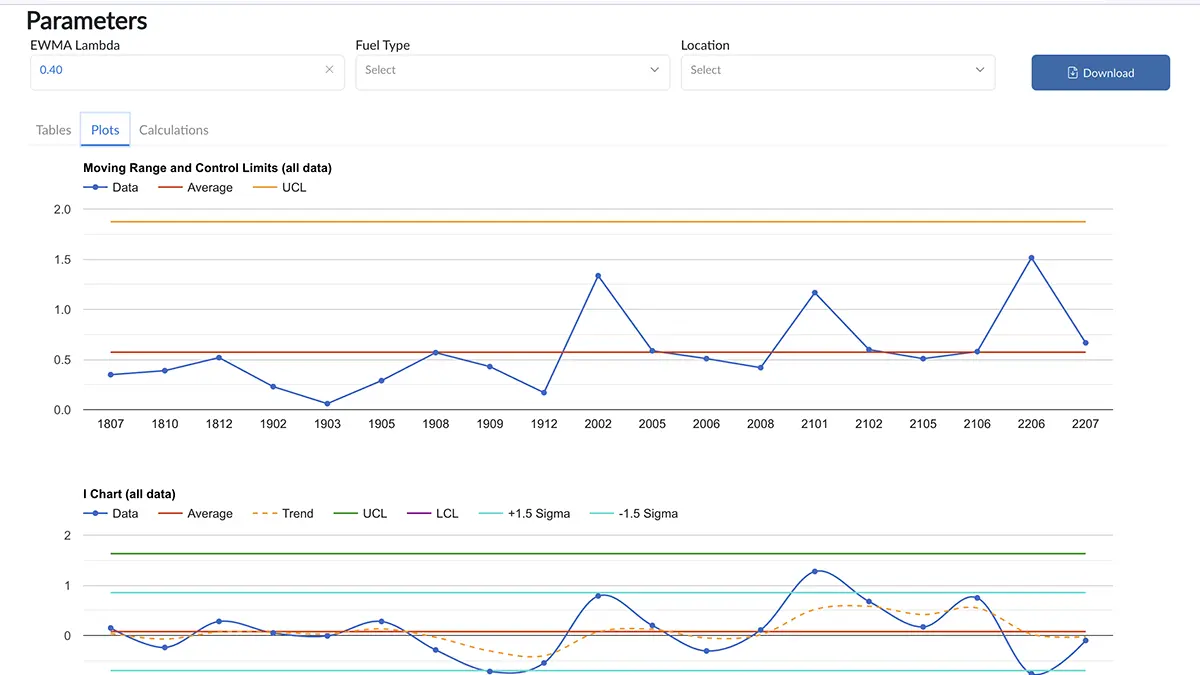
Internal & External ILCP
SRP’s ILCP application is a powerful tool designed to optimize your inter-laboratory cross-check programs.
Explore ILCPPillars
Total data ownership
Customer data is never used without explicit written permission.
Audit traceability
Detailed records support reliable audit trails for compliance.
Operational efficiency
Automate workflows so your team can focus on what matters.
How to edit this design system
- Re-skin the site: open
assets/css/tokens.cssand change values. Every page picks up changes automatically. - Add a component: add the styles in
assets/css/base.css(place it under a clearly-labelled comment block), then drop a demo here. - Add a page: copy any module page (e.g.
insightsqc.html) as a starting point. The header and footer markup live in each file — this is intentional for a zero-build static site, but it means edits to nav need to happen in every page. - Replace fonts: add a
@font-faceor Google Fonts link, then change--font-sans/--font-displayintokens.css. - Verify changes: open this style guide first, then sample 2–3 pages.